
To automate Walmart order fulfillment in 2025, it’s essential to understand that Walmart aims to automate 65% of its stores by 2026. Moreover, more than half of its fulfillment center activities are already automated. As a result, this growing push for Walmart order fulfillment automation is opening doors for marketplace sellers in ways that were previously impossible.
Walmart’s infrastructure is no longer just for the big players. Instead, every day, e-commerce vendors can now take advantage of advanced automation solutions. These tools were once out of reach for smaller businesses, but that’s changing fast.
The timing could not be better. Walmart’s fulfillment automation strategies in 2025 are arriving when customer expectations are higher than ever. Simply put, manual fulfillment can no longer keep up. In contrast, automated solutions can make fulfillment operations up to 40% more efficient. This boost can be a game-changer for sellers trying to scale.
This Walmart order fulfillment step-by-step guide gives you a clear path for automation in 2025. It covers everything from initial setup to advanced strategies that help you optimize over time. By the end, you’ll see how the right plan can transform your operations and unlock new growth.
What is Walmart Order Fulfillment Automation?
Walmart’s own Walmart Fulfillment Services (WFS) and third-party marketplace automation software work together to speed up delivery. This Walmart seller automation streamlines manual tasks like order processing, inventory updates, shipping label creation, and customer communication.
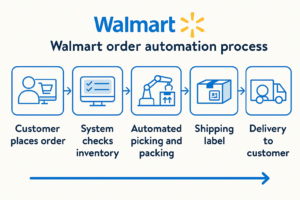
When a customer places an order on Walmart.com, the automation kicks in immediately. The system checks stock levels, creates picking instructions, and starts shipping, all without human help. As a result, processing time drops from hours or days to just minutes.
However, modern Walmart fulfillment automation does more than process orders. It also handles smart routing, dynamic pricing, and predictive inventory management. These features help sellers run efficiently while still managing special cases that need human attention.
Key Components of Automated Fulfillment
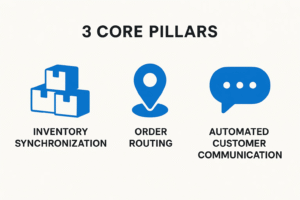
Inventory Synchronization
Inventory sync is the foundation of effective automation. Real-time updates across all sales channels prevent overselling and keep your Walmart listings accurate. This happens automatically through advanced systems, so you don’t need to track stock manually.
Order Routing Automation
Order routing determines the best way to fulfill each order. The system considers product location, shipping speed, and cost savings. Additionally, advanced setups can send orders to your own centers, WFS facilities, or third-party providers automatically.
Automated Customer Communication
Automated messaging handles purchase confirmations, shipping updates, and delivery notices. These messages stay professional while keeping customers informed—without requiring staff time.
Setting Up Walmart Fulfillment Services (WFS): Step-by-Step Guide
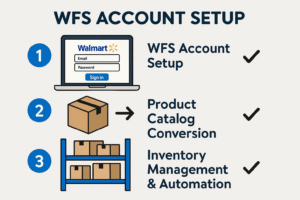
Getting started with WFS is straightforward, but it requires a few key steps. First, create your account in Seller Center and add your WFS information. Next, create new product listings or update existing ones for Walmart fulfillment. Finally, send your inventory to the assigned Walmart fulfillment center.
To make setup easier, follow this comprehensive guide to maximize automation from day one.
Step 1: WFS Account Setup and Configuration
Begin by navigating to your Walmart Seller Center and finding the WFS section. If you’re already selling on Walmart Marketplace, applying for WFS is simple. Just look for the application link in the left navigation menu. You’ll need to provide business, tax, and banking details for payment processing.
During setup, configure your return choices and customer service settings. WFS manages returns through Walmart’s store network. However, you must set rules for different products and return situations. These settings directly affect your automation performance, so align them with your business goals.
Payment setup is the final basic step. WFS uses a pay-per-use model, with fees deducted from your marketplace revenues. Understanding this structure helps you price products correctly while maintaining healthy margins.
Step 2: Product Catalog Conversion and Optimization
Planning your product conversion carefully leads to better WFS performance. To change fulfillment type, go to Seller Center, then Catalog. Scroll to the end of the row, click the three dots, and select “Fulfill with WFS.” That said, choosing products strategically often works better than converting everything at once.
Start with your best-selling products that have steady demand. These items offer the quickest benefits from automation. They also let you learn the system without risking your entire business. Furthermore, fast-moving inventory teaches you how WFS works and where to improve.
When preparing for WFS, focus on packing, labeling, and documentation. Items must ship from the US or clear customs before going to Walmart centers. They must also qualify for the WFS program. Proper preparation keeps everything on schedule and integrates smoothly with automation.
Step 3: Inventory Management and Automation Setup
Effective inventory automation requires clear restocking criteria and optimal safety stock levels. While WFS tracks inventory, skilled sellers add extra automation for stock monitoring and reorder alerts. This prevents stockouts before they happen.
Forecasting automation is equally important for maintaining ideal inventory levels. Advanced systems analyze past sales, seasonal patterns, and industry trends to predict future demand. Consequently, you can stock appropriately without tying up too much capital in slow-moving items.
Integration with your existing inventory systems ensures smooth data flow. Most successful sellers link WFS inventory to their main management system. This creates a single view of stock across all channels.
Third-Party Automation Tools and Software Solutions
WFS provides a strong starting point, but third-party solutions can significantly enhance your automation. These platforms offer specific features that complement Walmart’s services and give you more control.
Comprehensive Fulfillment Management Platforms
Platforms like Extensiv, Jazva, and eSellerHub integrate with WFS and add valuable automation features. They handle inventory allocation, order processing, picking, packing, label creation, and tracking. This prevents mistakes, overselling, and inefficient spreadsheet workflows.
Most platforms include reporting and analytics tools to improve your strategy over time. Real-time dashboards show important performance data. As a result, you can spot patterns and make data-driven decisions about fulfillment.
Multi-channel capabilities let you manage Walmart and other marketplaces together. This unified approach simplifies operations while keeping customer experience consistent across channels.
Specialized Automation Tools
Inventory Synchronization Tools: These provide real-time stock data across all channels to minimize overselling. They typically feature smart allocation that distributes inventory based on each channel’s performance.
Pricing Automation Software: Dynamic pricing tools adjust prices based on stock levels, competitor prices, and demand. This helps you stay competitive while maximizing profits.
Customer Service Automation: These tools handle routine questions and order status requests without human help. They integrate with Walmart’s messaging to answer quickly and route complex issues to staff.
Advanced Automation Strategies for 2025
Top Walmart sellers use advanced strategies that go beyond basic order processing. These approaches leverage new technologies to maximize both revenue and efficiency.

AI-Powered Demand Forecasting and Inventory Optimization
Artificial intelligence has transformed demand prediction. Walmart is leveraging AI to enhance its logistics and purchasing processes, utilizing GPT-4 to improve inventory allocation and demand prediction. strategies. Similarly, sellers can access third-party platforms that analyze diverse data sources for accurate predictions.
Machine learning algorithms improve over time by studying sales history, seasonal trends, promotions, and external factors like weather. This analysis enables more accurate inventory planning and reduces costs from stockouts or excess stock.
When inventory reaches certain levels, automated systems can create purchase orders automatically. These systems account for lead times, seasonal changes, and growth trends to keep stock optimal.
Dynamic Fulfillment Routing and Optimization
Advanced sellers use routing systems that determine the best fulfillment path for each order. These consider shipping costs, delivery speed, product location, and customer preferences in real time.
Geographic optimization is increasingly important. Systems automatically route orders to the nearest fulfillment center, cutting shipping costs and delivery times. This becomes even more valuable as sellers expand their fulfillment network.
Peak demand management maintains service levels during high-volume periods. These systems adjust fulfillment priority, shipping methods, and inventory allocation to handle surges without hurting customer experience.
Need personalized guidance on implementing advanced automation strategies? Contact our automation experts to discuss your specific requirements and optimization opportunities.
Cost Optimization Through Automation
Understanding the financial benefits of automation helps you make smart decisions about adoption. Typically, automation investments pay off in 3 to 6 months through improved efficiency and lower costs.
Direct Cost Reduction Opportunities
Lower labor costs provide the most immediate benefit. Automated solutions handle repetitive tasks that previously needed significant manual work. This frees staff for higher-value activities like business development and customer relationships.
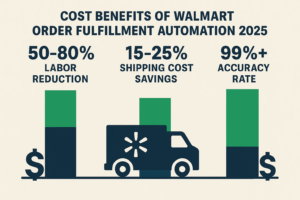
Transportation savings of 15-25% come from automated carrier selection and route planning. Systems monitor rates from multiple carriers in real time and choose the most cost-effective option while ensuring timely delivery.
Error reduction significantly impacts your bottom line. Manual processes have error rates around 2-3%, while automated systems achieve over 99% accuracy. This change cuts costs from returns, refunds, and customer service issues.
Long-Term Financial Benefits
Scalability benefits grow clearer as your business expands. Automated systems handle more volume without proportional increases in labor or infrastructure. This lets you pursue growth opportunities that might otherwise strain operations.
Better seller metrics and higher Buy Box win rates result from faster, more accurate fulfillment. Many merchants see revenue increases of 30–50%, far beyond automation setup costs.
Automated systems provide better data insights for ongoing optimization. Detailed analytics reveal customer behavior patterns, seasonal trends, and efficiency opportunities.
Integration with Your Existing E-commerce Stack
Effective automation must integrate smoothly with your existing technology. This ensures benefits spread throughout your business, not just isolated areas.
ERP and Accounting System Integration
Connecting fulfillment automation to ERP and accounting systems creates a unified business view. Integration tracks costs, maintains records, and generates reports automatically.
Real-time financial tracking shows how automation affects your bottom line. Systems monitor shipping costs, fulfillment expenses, and other metrics instantly.
Automated reporting creates regular performance summaries without manual work. These reports keep you informed on key metrics while reducing staff workload.
Multi-Channel Inventory Management
Effective automation extends beyond Walmart to cover all sales channels. Advanced systems can move goods between marketplaces based on performance, demand patterns, and strategic goals.
Cross-channel optimization maximizes inventory use and reduces stockout risk on high-performing channels. Systems adjust distribution based on real-time sales and demand forecasts.
Unified customer data across platforms provides insights for better fulfillment and service decisions. Understanding cross-channel customer behavior helps refine strategies.
Troubleshooting Common Automation Challenges
Even excellent automation systems occasionally need attention. Knowing common issues and solutions keeps operations running smoothly.
Technical Integration Issues
API connectivity problems can disrupt data transfer between systems. Strong error handling and backup methods prevent temporary issues from affecting orders. Monitoring tools alert you to problems before they cause operational impact.
Data synchronization delays can create brief inconsistencies. Adding buffer time to workflows handles delays while maintaining accuracy. Regular system health checks identify and resolve sync issues quickly.
Capacity limitations may appear as your business grows. Monitoring performance metrics helps spot bottlenecks early. Planning for increases ensures automation handles growth without slowdowns.
Operational Process Challenges
Quality control becomes harder with automation since traditional manual checkpoints may disappear. Automated quality checks and exception reporting maintain standards while preserving efficiency benefits. These flag unusual orders for human review.
Exception handling processes are essential when orders don’t fit standard automation rules. Well-designed systems process most requests automatically but route unusual cases to operators. Clear escalation procedures ensure complex orders get proper attention.
Staff training needs ongoing attention as systems evolve. Regular updates help your team use automation effectively and stay current on new features.
Measuring Automation Success: Key Performance Indicators
Tracking the right metrics shows how automation performs and where to improve. Effective measurement covers both operational efficiency and business results.
Operational Efficiency Metrics
Order processing time measures how long orders take from receipt to shipment. Automated systems typically cut processing time by 50-70% compared to manual methods. Top operations complete most orders same-day.
Fulfillment accuracy rates show how well automated processes work. Target rates above 99%, as errors become costly in high-volume automated operations.
Inventory turnover improvements result from better forecasting and optimization. Many merchants see 25-40% turnover increases after implementing comprehensive automation.
Business Impact Metrics
Sales growth from automation often appears within 30-60 days. Faster, more accurate delivery improves search rankings and customer confidence, driving organic growth.
Customer satisfaction scores gauge automation’s impact on experience. Monitor delivery performance, order accuracy, and response times to ensure operational changes improve outcomes.
Lower return rates often follow automated fulfillment due to better product information and accuracy. Tracking return patterns reveals improvement areas and automation impact on quality.
Advanced Features and Future-Proofing Your Setup
The best automation systems include innovative features for competitive advantage and future readiness.
Predictive Analytics and Machine Learning
Modern solutions increasingly include machine learning that improves over time. These systems find patterns in order data, inventory movements, and customer behavior to optimize fulfillment decisions.
Seasonal demand estimation helps organize inventory and ensure fulfillment capacity during busy periods. Machine learning algorithms uncover subtle patterns that humans might miss.
Customer behavior analysis through automated tools informs marketing and product decisions. Understanding how fulfillment affects customer lifetime value helps balance costs and satisfaction.
Emerging Technology Integration
Customers can order via AI-powered tools like “Text to Shop” using text or voice commands. Ensuring your systems handle these new order types maintains compatibility with Walmart’s evolving features.
Internet of Things (IoT) integration provides real-time visibility into inventory, equipment, and conditions. This enables more sophisticated automation rules and predictive maintenance.
Blockchain technology is beginning to transform supply chain visibility and traceability. While still emerging, understanding these trends prepares you for future opportunities.
Cost-Benefit Analysis: ROI of Walmart Fulfillment Automation
Understanding financial impacts requires examining both direct costs and indirect benefits. Most sellers report automation pays for itself within six months.
Initial Investment and Setup Costs
WFS has no upfront signup fees, but you need inventory for Walmart’s fulfillment facilities. Plan for 30-60 days of inventory, with costs varying by product mix and season.
Basic third-party automation programs cost $100-$500 monthly. Enterprise solutions run $1,000-$5,000 monthly depending on users and features. However, these tools often save more than they cost.
Integration and setup expenses include consulting, training, and configuration. Many sellers invest $2,000-$10,000 to launch, typically seeing returns within three months.
Ongoing Operational Savings
Lower labor expenses provide the largest recurring benefit for most suppliers. Automation can reduce fulfillment workers by 50-80%, allowing redeployment to higher-value tasks or overall cost reduction.
Better forecasting typically reduces carrying costs by 20-30% through optimized inventory use. This comes from maintaining optimal stock levels—avoiding both stockouts and excess inventory.
Higher customer lifetime value often follows faster, more accurate fulfillment. Many vendors see customer retention rates rise 15-25% after full automation.
Integration with Popular E-commerce Tools
Effective Walmart fulfillment automation integrates with your existing e-commerce infrastructure. This spreads benefits across all operations.
Accounting and Financial Management Integration
QuickBooks integration tracks fulfillment costs, shipping charges, and inventory values automatically. This eliminates manual bookkeeping and provides real-time performance visibility.
Automated cost allocation tracks profitability by product and fulfillment method. This visibility enables data-driven decisions about what to automate and which methods yield best returns.
Tax compliance automation is critical for multi-state sellers. Integrated systems determine and track tax obligations for inventory storage and fulfillment.
Customer Relationship Management (CRM) Integration
Linking CRM to fulfillment automation creates a complete customer view. This helps identify high-value customers who may need priority fulfillment or special handling.
Automated customer segmentation based on purchase history enables personalized service while maintaining efficiency. Use these insights for inventory planning and marketing campaigns.
Customer lifecycle automation triggers specific fulfillment actions based on customer status. For example, algorithms can expedite shipping for VIP customers or give first-time buyers extra attention.
Best Practices for Sustainable Automation
Long-term automation success requires ongoing attention to best practices. These suggestions maximize benefits while avoiding common pitfalls.
Continuous Monitoring and Optimization
Regular performance reviews ensure systems work well as your business changes. Analyze processing speed, accuracy, and customer satisfaction monthly to identify trends and improvements.
A/B testing different settings can improve performance over time. Testing variations in inventory allocation or shipping methods may reveal changes that significantly boost results.
Feedback loops ensure information from customer service, returns, and performance data continuously improves automation rules. This iterative approach keeps systems aligned with evolving needs.
Risk Management and Contingency Planning
Backup fulfillment methods protect against system failures or unexpected volume spikes. Maintaining relationships with alternative providers and some in-house capacity keeps the business running.
Data backup and recovery procedures protect information and enable quick system restarts. Regular backup testing ensures procedures work when needed.
Vendor relationship management becomes important when relying on multiple platforms. Maintaining strong relationships and communication helps resolve issues quickly.
Taking Action: Your Next Steps to Walmart Fulfillment Automation
Automating Walmart order fulfillment in 2025 requires a clear plan balancing current needs with future growth. The smartest approach is getting the basics right first, then gradually building out a comprehensive strategy.
Start by examining your current operations to find where automation will have the greatest impact. For most sellers, this means using WFS for high-volume products. Once that foundation is in place, bringing automation into other areas becomes easier. Sellers who commit to automation today position themselves for smoother scaling and stronger customer satisfaction ahead.
Remember that automation is not a one-time setup—it’s an ongoing process that evolves with your store. The best tools enhance efficiency over time, helping businesses stay competitive as expectations and conditions change. Whether you handle 10 orders monthly or 10,000, the right automation plan saves time, reduces errors, and fuels long-term growth.
Frequently Asked Questions
Q. How much does Walmart Fulfillment Services cost for automated order processing?
WFS costs $3–$8 per order with no upfront fees, plus $0.75 per cubic foot per month for storage. Fees are deducted automatically from marketplace earnings, simplifying cash flow. Most sellers find WFS costs 15-20% less than comparable providers while offering better marketplace integration and 2-day shipping eligibility.
Q. What products qualify for automated Walmart fulfillment through WFS?
Products must be new, unused items under 50 pounds with dimensions under 25 inches on any side. Items need individual packaging and labeling, plus compliance with marketplace policies. Most consumer goods, electronics, home items, and apparel qualify. However, hazardous materials, perishables, and regulated products are excluded.
Q. How long does it take to set up automated Walmart order fulfillment?
Basic WFS setup takes 2-4 weeks total. This includes account approval (3-5 business days), inventory preparation and shipping (1-2 weeks), and testing (2-3 days). Comprehensive automation with third-party tools requires 4-6 weeks. That said, many sellers see benefits within the first week of inventory arriving at Walmart centers.
Q. Can I automate Walmart fulfillment without using WFS?
Yes, platforms like Extensiv, Jazva, and ShipStation provide automated order processing, inventory management, and shipping for seller-fulfilled orders. Nevertheless, WFS offers unique advantages like automatic 2-day shipping eligibility and streamlined returns that are hard to replicate. Many successful sellers combine WFS for core products with third-party automation for specialized items.
Q. What happens if automated fulfillment systems experience technical problems?
Modern systems include robust error handling and backup procedures. WFS has built-in redundancy, ensuring uninterrupted processing during technical issues. Third-party platforms include monitoring with manual override capabilities. Most sellers use hybrid approaches, allowing quick switching between automated and manual processes.
