
Why Automate Your eBay Store in 2025?
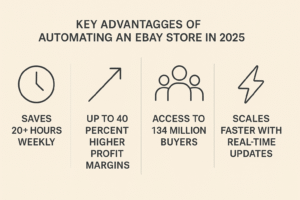
Setting up an automated eBay store in 2025 is one of the smartest ways to scale your eCommerce business, with automation saving sellers over 20+ hours per week and increasing profits by up to 40% according to recent eBay seller reports. eBay currently connects over 134 million buyers and 18.3 million sellers, per the latest data from Statista, creating an incredibly competitive marketplace where efficiency is key.
The shift toward automation is no longer just a trend; it has become essential for survival in today’s competitive marketplace. For each buyer-seller transaction, eBay makes more than 13¢ on the dollar. In 2024, worldwide, buyers outnumbered sellers on eBay by more than 7:1. With this level of competition and thousands of new sellers joining daily, manual management simply can’t keep up with the pace required to stay competitive.
Consider this: while you’re manually updating prices for 50 products, your automated competitors are updating thousands in real-time. While you’re copying and pasting tracking numbers, they’re automatically syncing everything and focusing on scaling their business. The automation advantage is real, and 2025 is the year to claim it.
Step 1 – Create a Professional eBay Seller Account
Before diving into automation tools, you need a solid foundation. According to the official eBay Seller Center, a properly configured business account helps your automation tools integrate seamlessly.
Start with a business account rather than a persona; this immediately builds more trust with buyers and gives you access to advanced seller tools. Your business name should be memorable and professional, something that buyers will remember and trust when they see it in search results.
Payment setup is crucial here. Link a business bank account and ensure your PayPal account is verified and at the business level. Many eBay store setup guide 2025 tutorials skip this, but payment processing delays can break your automation workflows.
Don’t forget to complete your seller profile entirely. Add a professional photo, write a compelling about section, and clearly set up your return policies. Automation tools work more effectively when your account appears established and trustworthy to eBay’s algorithms.
Step 2 – Choose the Right Automation Strategy
Here’s where most people get overwhelmed. There are several paths you can take, and choosing the wrong one can cost you months of progress.
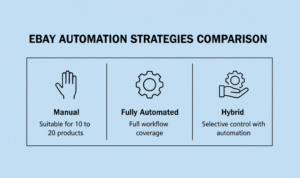
Manual vs. Fully Automated vs. Hybrid Approach:
Manual management may be effective for 10-20 products, but it becomes impractical beyond that. Full automation handles everything from listing to customer service, while hybrid approaches allow you to maintain control over specific aspects while automating repetitive tasks.
Your business model determines your automation strategy. Dropshipping requires different tools than wholesale or private label. If you’re wondering how to automate eBay store operations effectively, start by identifying the model that best fits your goals and resources.
Dropshipping automation places a strong emphasis on supplier integration and real-time inventory synchronization. Wholesale automation emphasizes bulk listing management and repricing. Private label automation concentrates on inventory management and brand protection.
Step 3 – Integrate the Best Automation Tools
The tool landscape has evolved significantly in 2025, with new players entering the market and established tools adding advanced AI features. Here’s what you need to know about the top eBay automation tools available right now.
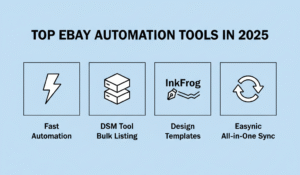
AutoDS remains the market leader in dropshipping automation, offering seamless integration with major suppliers including Amazon, Walmart, and AliExpress. As an all-in-one dropshipping platform, AutoDS handles product finding & sourcing, 24/7 price & stock monitoring, and automated order fulfillment. Its system automatically increases profits after a product sale and decreases prices when products stop selling to maintain competitiveness.
DSM Tool has carved out a niche in wholesale automation, with a particular strength in bulk listing management and multi-supplier coordination. Their dashboard gives you oversight without micromanagement.
InkFrog focuses on listing optimization and template management, perfect for sellers who want professional-looking listings without hiring designers. Their A/B testing features help optimize conversion rates automatically.
Easync is the newcomer making waves with its all-in-one approach, combining listing management, order processing, and customer service automation in a single platform. Easync detects growing product sales and helps boost them to increase profit, while handling everything from order placement to tracking. This allows sellers to connect their eBay dropshipping store account in minutes.
| Tool | Auto-Listing | Supplier Integration | Pricing Sync | Messaging | Best Use Case | Price |
| AutoDS | ✅ | ✅
Amazon / Walmart |
✅
AI Pricing |
✅
Smart Chat |
Dropshipping | $29–$79 |
| DSM Tool | ✅ | ✅
Multiple Suppliers |
✅
Basic |
✅ | Wholesale Bulk Uploads | $19–$49 |
| InkFrog | ✅ | ❌ | ❌ | ✅ Templates | Listing Designs | $11–$29 |
| Easync | ✅ | ✅
Many Platforms |
✅
Fast |
✅ | All-in-One Automation | $25–$65 |
Step 4 – Set Up Product Sourcing and Listings
Product sourcing automation has become incredibly sophisticated. The best systems now scan multiple suppliers simultaneously, comparing prices, availability, and shipping times to automatically recommend the most profitable products.
eBay dropshipping automation starts with supplier integration. Connect your chosen suppliers through the API connections of your automation tool. Most tools now support direct integration with Walmart, Amazon, AliExpress, and hundreds of wholesale suppliers.
Product research automation is where the magic happens. Instead of manually browsing products, set up filters for profit margins, competition levels, and demand indicators. Let the software present you with pre-vetted opportunities.
When it comes to listing optimization, automation tools now use AI to write compelling titles and descriptions. They analyze top-performing listings in your category and adapt the language to match buyer search patterns. This isn’t just copying, it’s intelligent optimization based on real performance data.
Step 5 – Automate Order Fulfillment and Tracking
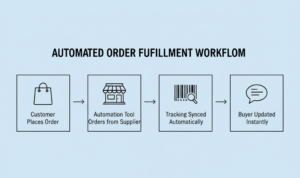
This is where automated order processing really shines for eBay. When a customer places an order, your system should immediately purchase the item from your supplier, capture the tracking information, and update the buyer, all without your involvement.
The workflow looks simple, but requires sophisticated coordination behind the scenes. Your automation tool needs to monitor your eBay sales in real-time, have sufficient permissions to place supplier orders, and maintain accurate tracking synchronization.
Returns processing can also be automated to a large extent. Set up rules for common return scenarios, such as defective items, incorrect size, and buyer’s remorse, and let the system handle the initial response and generate the return label.
Stock monitoring prevents the nightmare scenario of selling items you can’t fulfill. Advanced tools now predict stock-outs based on supplier patterns and automatically pause listings before you oversell.
Step 6 – Monitor Performance with Analytics and Feedback Tools
Running an automated store doesn’t mean running a blind store. You need visibility into what’s working and what isn’t, which is where performance monitoring becomes crucial for anyone looking to scale eBay business operations effectively.
Modern automation platforms provide dashboards that would make Fortune 500 companies jealous. Track conversion rates by product category, monitor profit margins in real-time, and identify trending products before your competitors notice them.
Feedback automation has evolved beyond simple “please leave feedback” messages. The best systems now analyze buyer behavior to determine the optimal timing and messaging for feedback requests, resulting in significantly higher response rates.
Revenue analytics help you understand not just what you’re selling, but why certain products perform better than others. This data feeds back into your product research automation, creating a continuous improvement loop.
Step 7 – Maintain Your eBay Account Health Automatically
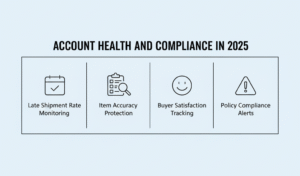
eBay’s 2025 policies are stricter than ever, but automation tools have adapted with sophisticated compliance monitoring. To stay in compliance, study eBay’s up-to-date Seller Performance Standards so your automated store maintains healthy account metrics.
Performance monitoring tools now track metrics such as late shipment rates, item-not-as-described cases, and buyer satisfaction scores in real-time. They’ll alert you before problems become account-threatening issues.
Policy compliance automation helps you stay current with eBay’s evolving requirements. From restricted item monitoring to international shipping regulations, these tools ensure you’re always operating within guidelines.
Violation prevention has shifted from a reactive to a predictive approach. Advanced systems analyze your listing patterns and supplier performance to identify potential issues before they impact your account standing.
Common Mistakes to Avoid While Automating
The biggest mistake I see new sellers make is choosing automation tools based purely on price. Cheap tools often lack proper eBay integration, leading to account restrictions or suspensions that cost far more than premium software ever would.
Over-automation is another trap. Not everything should be automated, especially customer service for complex issues. Buyers can tell when they’re talking to a bot, and poor customer service reviews can destroy your seller metrics.
Ignoring supplier quality control is automation suicide. Your reputation depends on reliable suppliers, and no amount of automation can fix a supplier who consistently ships defective products or misses delivery dates.
Many sellers automate before understanding eBay’s ecosystem. Learn the platform manually first, understand buyer behavior and eBay’s policies, then apply automation to amplify what works.
Final Thoughts – Is an Automated eBay Store Worth It in 2025?
The data is clear: the best automation software for eBay has matured to the point where manual management is becoming obsolete for serious sellers. With eBay’s revenue reaching $10.112 billion in 2023 and a net income of $2.16 billion in the first three quarters of 2024, the platform’s growth creates opportunities for sellers who can operate efficiently at scale.
Full automation works best for sellers committed to treating this as a serious business. If you’re looking for passive income with a minimal learning curve, you might be disappointed. But if you’re willing to invest time in setup and optimization, the ROI potential in 6-12 months is substantial.
The sellers succeeding in 2025 are those who view automation as a competitive advantage, not just a convenience tool. They’re using saved time to focus on strategy, market expansion, and customer experience rather than getting bogged down in operational tasks.
Frequently Asked Questions
Q. How do I automate my eBay store in 2025?
Start with trusted eBay automation tools that handle product uploads, order processing, pricing, and tracking, combined with reliable supplier integration. The key is to choose tools that work well together and align with your business model.
Q. What are the best tools for eBay automation?
AutoDS, DSM Tool, Easync, and InkFrog are the top choices in 2025 due to their comprehensive features, reliable supplier integration, and eBay compliance. Each specializes in different aspects of automation, so choose based on your specific needs.
Q. Can you run an eBay store without manual work?
Yes, with proper automation setup, you can minimize manual tasks by up to 90%. However, strategic decisions, supplier relationship management, and complex customer service issues still require human oversight.
Q. Is eBay automation allowed?
eBay allows automation as long as you follow their policies, use approved software, and maintain quality customer service. The key is ensuring your automation tools comply with eBay’s terms of service and don’t compromise buyer experience.
Q. How much does it cost to automate an eBay store?
Automation costs typically range from $30 to $200 per month, depending on the tools used, the number of listings, and the required service level. While this might seem expensive initially, most sellers see ROI within 2-3 months through time savings and increased sales volume.
Want a hands-free eBay store? Our eBay Automation Services handle everything from listing creation to customer support, allowing you to focus on growing your business instead of managing daily operations. [Explore Services]
