
YouTube Automation Costs 2025: Complete Breakdown
YouTube automation costs in 2025 range from $500 to more than $5,000 per month. Additionally, the actual amount depends on your niche and production quality. Interestingly, analysts predict that nearly 58% of mid-sized creators will adopt automation tools by year’s end. Therefore, this shows growing mainstream adoption within the ecosystem.
For entrepreneurs launching their first faceless channel, knowing the financial commitment is crucial. Similarly, existing creators looking to scale need this information too. Overall, the landscape has changed significantly compared to previous years. Furthermore, AI tools make certain production aspects more cost-effective now. However, rising competition compels creators to aim for higher quality consistently. Consequently, this drives expenses higher across the board.
This complete breakdown covers every part of the investment thoroughly. First, it includes startup expenses like branding and software purchases. Second, it addresses recurring monthly costs for operations. Moreover, proper budgeting helps creators understand expected costs clearly. Eventually, they can position their channels for profitability successfully.
What Is YouTube Automation and Why Are Costs Rising?
YouTube automation is the practice of managing a channel with minimal personal involvement effectively. Essentially, you outsource content creation, editing, and publishing tasks completely. Instead of appearing on camera personally, YouTube automation channels rely on voiceovers primarily. Additionally, they use stock footage or animations extensively. Meanwhile, these elements help produce videos consistently over time. For beginners specifically, the YouTube Creator Academy offers helpful resources generously. Moreover, it explains how the platform works fundamentally.
In 2025, YouTube automation costs have shifted noticeably across the industry. On the one hand, AI tools have lowered certain expenses significantly. For example, script generation and voiceovers cost less now than before. On the other hand, platform competition pushes creators to invest more heavily. This includes spending on editing and visuals, particularly. Additionally, SEO tools like TubeBuddy and VidIQ are essential nowadays. As a result, higher quality demand has led to increased costs universally.
The Core Components Driving YouTube Automation Expenses
Before examining exact numbers specifically, understanding the primary factors is essential fundamentally. Every YouTube automation channel spends across a few core areas consistently. Whether small or scaling fast, these expenses apply universally.
Content Creation: First and foremost, scripts, voiceovers, editing, and thumbnails make up the bulk of expenses. Therefore, these are production necessities absolutely.
Tools and Software: Similarly, AI platforms streamline workflows significantly nowadays. Additionally, video editing programs are essential for quality. Platforms like TubeBuddy add to monthly costs, admittedly. Nevertheless, they remain critical for long-term growth.
Team Members: Furthermore, freelancers handle daily tasks efficiently always. Similarly, virtual assistants and contractors help maintain consistency. As a result, they keep content flowing smoothly.
Marketing and Growth: Finally, SEO tools drive visibility effectively online. Furthermore, paid promotions attract viewers consistently. Advertising campaigns support long-term performance too.
Ready to explore how YouTube automation can transform your business dramatically? Discover our comprehensive automation solutions that help entrepreneurs build profitable YouTube automation channels successfully.
YouTube Automation Startup Costs in 2025
Initial Investment Requirements
Starting a YouTube automation channel requires some initial investment, undoubtedly. These are mostly one-time costs, typically. Moreover, they create the foundation for long-term growth substantially. Here’s where most creators put money initially.
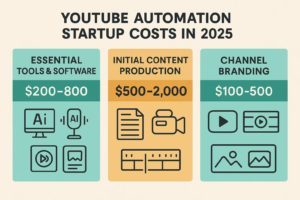
Essential Software and Tools ($200-800)
Every YouTube automation channel needs basic tools fundamentally:
- Video editing programs like Adobe Premiere Pro cost $20–50 monthly, typically. Alternatively, Final Cut Pro is another excellent option.
- AI voice tools like ElevenLabs run $30–100 monthly, usually. Similarly, Murf offers comparable services effectively.
- Thumbnail software, including Canva Pro, costs $15–25 monthly generally. Alternatively, Photoshop works well too professionally.
- Project management apps like Notion run $10–20 monthly normally. Additionally, Trello is popular among creators.
- SEO tools like TubeBuddy cost $10–40 monthly, typically. Similarly, VidIQ offers great features comprehensively.
Initial Content Production ($500-2,000)
Most successful YouTube automation channels start with 10–20 videos initially. This helps gain algorithm recognition effectively. Outsourcing costs average $40 per video, typically. However, prices vary by niche significantly.
Channel Setup and Branding ($100-500)
Professional appearance requires these essentials fundamentally:
- Logo and banner design runs $50–200 usually. Therefore, invest in quality graphics wisely.
- Channel optimization costs $50–150 typically. Additionally, keyword research is included here.
- Brand assets range from $50–150 generally. Moreover, initial channel art matters significantly.
Spending in these areas ensures a proper YouTube automation setup effectively. Moreover, it establishes credibility with viewers strongly.
Budget-Friendly vs Premium YouTube Automation Startup Approaches
Your upfront spending depends significantly on your chosen approach. Most creators fall into two camps, typically.
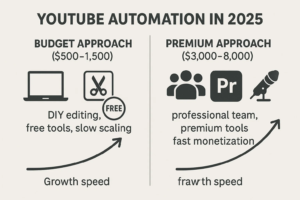
Budget Approach ($500-1,500 total)
This route keeps expenses low initially deliberately. You handle work yourself using free tools primarily. Gradually, you outsource as revenue grows naturally. Many channels began this way successfully. Moreover, they reinvested profits consistently over time. For beginners, especially, Canva helps significantly. Additionally, free editing software reduces expenses considerably.
Premium Approach ($3,000-8,000 total)
Some creators invest heavily from the start intentionally. This involves hiring professional editors and scriptwriters immediately. Additionally, it includes voiceover talent from the beginning. Although requiring a larger financial commitment upfront, this method accelerates growth substantially. As a result, monetization occurs faster than expected. Established creators scaling multiple channels take this route commonly.
Both strategies work well ultimately. It depends on your budget and timeline for your YouTube automation business primarily.
Monthly Operating Costs for YouTube Automation Breakdown
Content Production Expenses for YouTube Automation
Content creation represents the largest recurring expense in YouTube automation, undoubtedly. While tools play important roles certainly, scripts drive growth fundamentally. Similarly, voiceovers and editing matter greatly for quality. For most faceless YouTube automation channels, accordingly, the majority of the budget goes here monthly.
Per-Video Costs in 2025:
Here’s the current breakdown per video specifically:
- Script writing runs $10–30 typically. Therefore, budget accordingly for this.
- Voiceover work costs $10–50 generally. AI voices run $5–15 usually. Meanwhile, human voices cost $20–50 normally.
- Video editing ranges from $20–80 commonly. Additionally, complexity affects price significantly.
- Thumbnail design costs $5–15, typically. Moreover, quality matters significantly for clicks.
- Total per video runs $45–175 overall. Consequently, plan your budget carefully.
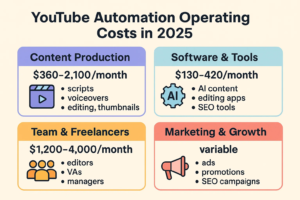
For channels publishing 8–12 videos monthly, expenses range from $360 to $2,100 typically. This depends substantially on niche competition. Moreover, production quality affects costs directly. These expenses are unavoidable for scaling, unfortunately. However, they connect to revenue growth directly.
Technology and Software Subscriptions
Modern YouTube automation channels rely extensively on specialized tools. These streamline production significantly nowadays. Moreover, they maintain efficient workflows consistently. Common monthly costs include specifically:
- AI content tools like ChatGPT run $50–150 monthly. Similarly, Jasper offers great features too.
- Video editing software costs $20–80, typically. For example, Adobe Premiere Pro is popular widely.
- Analytics tools range from $30–100 normally. TubeBuddy and VidIQ are essential here.
- Cloud storage costs $15–50 monthly. Google Drive and Dropbox work well and reliably.
- Project management platforms run $15–40 usually. Notion and Trello are favorites among creators.
- Total monthly software costs: $130–420
These tools form a hidden YouTube automation channel expenses, unfortunately. Beginners often underestimate them initially.
Team and Freelancer Costs
As channels grow naturally, creators assemble small YouTube automation teams strategically. This maintains output effectively over time. Moreover, it improves quality significantly with expertise. Typical roles include specifically:
- Virtual Assistant: $300-800 monthly normally. Part-time or full-time options exist here.
- Dedicated Editor: $500-1,500 monthly, typically. Quality editing matters greatly for retention.
- Script Writer: $400-1,000 monthly, usually. Additionally, research skills help immensely.
- Thumbnail Designer: $200-600 monthly, generally. Eye-catching visuals drive clicks effectively.
- Channel Manager: $800-2,500 monthly commonly. Overall coordination is essential for success.
Most profitable channels operate with 2–4 team members typically. This results in costs from $1,200 to $4,000 monthly overall. While it may feel like a heavy investment initially, it makes scaling possible long-term.
Need help building your YouTube automation team effectively? Contact our experts who specialize in connecting businesses with vetted professionals successfully.
Cost Variations by Channel Type and Niche
Not every channel spends the same amount, obviously. That’s a significant factor in understanding costs thoroughly. Your chosen niche always impacts expenses directly. Moreover, it affects software needs and team requirements substantially. Here’s how costs break down specifically.
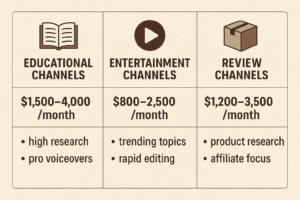
Educational and Tutorial Channels
These channels incur higher expenses, typically compared to others. Research and accuracy requirements drive costs up significantly. Fact-checking adds to budgets considerably. Similarly, sourcing credible data matters immensely. Professional voice-overs increase expenses, too.
- Monthly costs: $1,500-4,000
- Per-video investment: $60-150
- Key expenses: Research, voiceovers, editing
While upfront costs run higher initially, educational content earns stronger CPM rates overall. Therefore, the investment proves worthwhile long-term financially.
Entertainment and Viral Content Channels
Entertainment channels prioritize fast production primarily nowadays. High volume matters greatly here for algorithms. They chase trends constantly and aggressively. Moreover, viral topics drive their strategy completely. Costs run lower per video comparatively. Nevertheless, posting frequency must stay high consistently.
- Monthly costs: $800-2,500
- Per-video investment: $30-80
- Key expenses: Trend research, fast editing, thumbnails
Automation pricing prioritizes quantity over depth here deliberately. This approach builds large audiences quickly for YouTube automation successfully.
Review and Product Channels
This type combines educational and entertainment aspects cleverly. Furthermore, it taps into commercial opportunities strategically. Affiliate marketing generates revenue effectively. Similarly, sponsorships provide income reliably. Costs increase with product access needs sometimes. Additionally, licensing affects expenses significantly.
- Monthly costs: $1,200-3,500
- Per-video investment: $50-120
- Key expenses: Product research, scripts, presentation
Niche-Specific Cost Considerations
Some niches command higher production budgets naturally. Specialized expertise drives this entirely. Moreover, technical knowledge requirements matter substantially. For example, specifically:
High-Cost Niches: Finance dominates this category clearly. Additionally, legal advice and medical information fit here perfectly. Technology reviews are expensive, too, comparatively.
Medium-Cost Niches: Lifestyle content fits here comfortably. Travel vlogs work well here. Similarly, food content performs strongly consistently. General entertainment rounds out this category.
Lower-Cost Niches: Simple tutorials work best economically. Compilation videos are affordable relatively. Moreover, basic entertainment content costs less overall.
Cost Variations by Channel Type and Niche
| Channel Type / Niche | Monthly Costs | Per-Video Costs | Key Expenses | Profit Potential |
|---|---|---|---|---|
| Educational & Tutorial | $1,500 – $4,000 | $60 – $150 | Research, fact-checking, professional voiceovers, and detailed editing | Higher CPM rates, strong long-term ROI |
| Entertainment & Viral | $800 – $2,500 | $30 – $80 | Trend research, rapid editing, viral-focused thumbnails | Lower CPM, depends on high posting frequency |
| Review & Product | $1,200 – $3,500 | $50 – $120 | Product research, licensing, polished scripts & presentation | Monetization through affiliate marketing & sponsorships |
| High-Cost Niches (Finance, Legal, Medical, Tech) | $2,500 – $5,000+ | $100 – $200+ | Specialized expertise, accuracy requirements | Very high CPM & brand deal potential |
| Medium-Cost Niches (Lifestyle, Travel, Food) | $1,000 – $3,000 | $40 – $100 | Content planning, editing, influencer tie-ins | Steady CPM, strong sponsorship appeal |
| Lower-Cost Niches (Simple Tutorials, Compilations) | $500 – $1,500 | $20 – $60 | Basic editing, simple graphics, stock footage | Lower CPM relies on volume & consistency |
Educational content incurs higher costs but delivers stronger CPMs ultimately. Meanwhile, entertainment channels keep costs lower comparatively. However, they require more frequent uploads consistently. Review channels fall in the middle financially. Moreover, they unlock additional revenue streams successfully.
When creators ask about the lowest expenses specifically, simple tutorials provide the answer clearly. However, niches like finance generate substantially higher returns. Despite their expense initially, they prove worthwhile eventually.
Hidden Costs and Unexpected Expenses
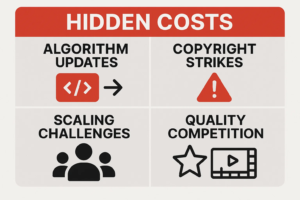
One big mistake involves underestimating hidden costs unfortunately. Startup expenses are easier to predict initially. Nevertheless, surprise factors creep into budgets gradually. Planning early prevents disruptions effectively. Moreover, it keeps channels running smoothly consistently.
Platform Changes and Algorithm Updates
YouTube’s algorithm evolves constantly over time. Recent updates favor longer videos specifically. Additionally, higher production quality matters more nowadays. Therefore, creators must invest more heavily. Editing requires bigger budgets now. Similarly, scripting and visuals cost more substantially. What worked in 2023 needs larger budgets in 2025.
Content Strikes and Copyright Issues
Copyright claims rank among overlooked expenses, unfortunately. Even with fair use, disputes happen frequently. Moreover, stock footage doesn’t guarantee safety completely. Experts recommend budgeting 5–10% of monthly costs specifically. This covers flagged videos adequately. Additionally, it handles replacement content quickly. Legal support may be needed, too. YouTube’s copyright resources highlight strict rules clearly.
Scaling Challenges
Growth sounds exciting initially for everyone. However, it often brings financial squeezes unexpectedly. Many channels experience tough 6-month phases commonly. During this stage specifically, expenses grow faster than income, unfortunately. Investing in teams feels overwhelming then. Moreover, tools and resources require significant capital investment. Nevertheless, it’s necessary for sustainable profitability eventually.
Competition and Quality Arms Race
As more creators adopt automation tools, competition skyrockets naturally. Continual upgrades become necessary for standing out. Better editing helps you differentiate significantly. Similarly, stronger research matters greatly for authority. Higher-quality voice-overs make a difference too noticeably. Most successful channels plan for 10-15% annual increases accordingly. This maintains their algorithm positioning effectively.
Revenue Potential vs Investment Analysis
Realistic Earnings Timeline
When creators discuss profitability, one key question arises naturally. How much can channels realistically earn, specifically? Moreover, how does this compare to ongoing costs exactly? Results vary widely, admittedly, across niches. However, with the right niche, channels can scale significantly. Proper investment helps greatly here. Additionally, patience proves essential ultimately.
- Months 1-6: Focus on building audiences initially first. Meeting monetization requirements takes time necessarily.
- Months 7-12: Initial revenue covers 60-80% of costs typically. Progress becomes visible here gradually.
- Months 13-18: Well-managed channels finally achieve profitability. Hard work pays off eventually.
- Months 18+: Successful channels generate substantial passive income consistently. Long-term rewards appear clearly.
Return on Investment Calculations
Examining scenarios helps understand long-term ROI thoroughly. Both conservative and aggressive approaches work effectively.
Conservative Scenario:
- Monthly investment: $1,500
- Break-even timeline: 12-15 months
- Annual ROI after break-even: 150-200%
Aggressive Growth Scenario:
- Monthly investment: $3,500
- Break-even timeline: 8-12 months
- Annual ROI after break-even: 250-400%
Differences come down to content quality primarily. Additionally, consistency matters greatly for algorithms. Expense optimization affects outcomes too significantly.
Cost-Saving Strategies for YouTube Automation
Keeping costs under control remains essential always. Revenue potential is substantial, admittedly overall. However, profits grow only when expenses are managed wisely. In 2025, creators have more options than ever before. Cutting costs without lowering quality is possible now.
Leveraging AI Tools Effectively
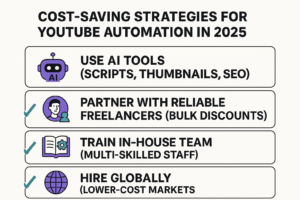
Artificial intelligence has transformed YouTube automation operations dramatically. AI-powered tools handle tasks efficiently nowadays. Previously, entire teams were needed for this. Now, content creation is faster significantly. Moreover, it’s far more affordable comparatively.
AI Cost-Saving Applications:
- Script generation streamlines writing significantly nowadays. Optimization improves quality too automatically.
- Automated editing works for simple formats effectively. Time savings are substantial here.
- Thumbnail creation improves visuals greatly overall. A/B testing helps conversions too.
- SEO optimization boosts discoverability dramatically. Keyword research drives traffic too consistently.
Building Strategic Partnerships
Developing relationships with reliable freelancers helps substantially. Bulk discounts save money significantly over time. Moreover, retainer rates reduce costs considerably. Many successful channels negotiate 20-30% savings successfully. Committing to consistent monthly work volumes achieves this.
Vertical Integration Opportunities
As channels grow naturally, bringing tasks in-house makes sense for YouTube automation financially. Consider these approaches strategically:
- Training team members on multiple skills expands capabilities significantly. Versatility saves money long-term.
- Investing in better equipment provides higher-quality output. Per-unit costs drop significantly then.
- Developing proprietary processes reduces outsourcing needs substantially. Independence brings savings eventually.
Geographic Cost Arbitrage
Using global talent markets reduces costs significantly nowadays. Many successful channels hire skilled freelancers internationally strategically. Lower cost-of-living regions provide advantages substantially. Meanwhile, strict quality standards are maintained consistently. This approach enables access to professional services affordably. Editing, scriptwriting, and voiceovers cost less here. Expenses stay controlled as production scales up.
Tools and Software Cost Comparison for YouTube Automation 2025
Video Editing Solutions
Budget Options ($0-30/month):
- DaVinci Resolve is completely free, remarkably. Moreover, it offers professional features extensively.
- Filmora costs $20 monthly, typically. It’s user-friendly for beginners, especially.
- Canva Video runs $15 monthl,y usually. Additionally, it integrates with design tools seamlessly.
Professional Options ($30-80/month):
- Adobe Premiere Pro costs $50 monthly, typically. Industry-standard quality is delivered consistently.
- Final Cut Pro requires a $300 one-time payment only. Mac users love it particularly.
- Avid Media Composer runs $60 monthly normally. Professional studios prefer it widely.
AI Voice and Content Generation
Voice Generation:
- ElevenLabs ranges from $30-100 monthly, typically. Quality is exceptional here consistently.
- Murf costs $20-80 monthly, usually. Multiple voice options exist here.
- Speechify runs $15-50 monthly normally. Natural-sounding results appear reliably.
Content Creation:
- ChatGPT Plus costs $20 monthly only. Writing assistance is powerful here.
- Copy.ai ranges from $35-90 monthly, typically. Marketing copy excels here, particularly.
- Jasper runs $50-150 monthly, usually. Long-form content works well consistently.
Analytics and Optimization
Channel Management:
- TubeBuddy costs $10-40 monthly, typically. SEO tools are comprehensive here.
- VidIQ runs $15-80 monthly, usually. Analytics are detailed here thoroughly.
- Social Blade Pro costs $20 monthly only. Competitor tracking helps the strategy significantly.
Transform your YouTube automation strategy with professional services today. Explore our YouTube automation packages designed to maximize ROI effectively.
Regional Cost Variations in YouTube Automation
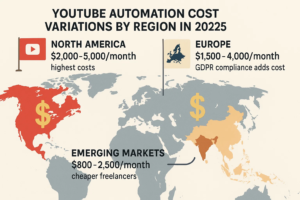
North American Market
US and Canadian costs typically run the highest globally. Premium freelancer rates drive this primarily. Additionally, software subscriptions cost more here substantially.
- Average monthly costs: $2,000 to $5,000
- Per video costs: $60 to $200
- Team member rates: 20-30% above global averages
European Market
European costs vary by country significantly naturally. Generally, they fall between North American and emerging market rates proportionally.
- Average monthly costs: $1,500 to $4,000
- Regulatory compliance adds 5-10% to expenses typically
- GDPR requirements influence tool selection significantly
Emerging Markets
Countries like India provide substantial financial advantages. The Philippines offers significant cost savings. Eastern Europe has skilled talent abundantly.
- Average monthly costs: $800 to $2,500
- Skilled freelancers work at 40-60% lower rates
- Language barriers may require additional coordination sometimes
Budgeting and Financial Planning for YouTube Automation
Creating Realistic Financial Projections
Building profitable YouTube automation channels depends on clear expectations fundamentally. Thoughtful planning is essential here always. Moreover, preparing for different scenarios helps substantially.
Conservative Planning Model:
- Assume 15-18 months before profitability is realistic. Patience is required initially, always.
- Budget for 6 months without revenue safely. Safety nets matter greatly here.
- Plan for costs running 25% higher conservatively. Surprises happen frequently, unfortunately.
Growth-Focused Model:
- Invest in premium quality from the start deliberately. Quality accelerates growth significantly faster.
- Expect profitability in 8-12 months optimistically. Faster results are possible here.
- Reinvest 70-80% of early profits wisely. Scaling requires capital reinvestment necessarily.
Cash Flow Management
Cash flow often runs unevenly for YouTube automation businesses initially, unfortunately. The first year challenges most businesses typically. To reduce risk effectively, consider these approaches:
- Maintain reserves for 3-6 months’ expenses safely. Safety buffers prevent disasters completely.
- Negotiate payment terms with freelancers strategically. Stabilizing costs helps greatly overall.
- Explore invoice factoring when needed. Large team expenses require flexibility sometimes.
Tax Considerations and Deductions
Many YouTube automation costs qualify for deductions, fortunately. This reduces overall expenses significantly annually. Eligible deductions include specifically:
- Monthly software subscriptions save tax dollars substantially. Automation tools qualify too here.
- Payments to freelancers reduce taxable income directly. Contractor costs are deductible completely.
- Equipment purchases provide substantial tax benefits. Technology for production qualifies here.
- Home office expenses lower tax bills significantly. Managing channels from home counts fully.
Always consult a tax professional experienced in digital media. Proper planning ensures complete compliance. Moreover, it maximizes deduction benefits substantially.
Conclusion
YouTube automation remains promising in 2025, undoubtedly. However, success requires sound financial planning consistently. Realistic timeline expectations matter too significantly. Initial investments range from $500 to $5,000 typically. Meanwhile, monthly costs run from $800 to $4,000 usually. For committed entrepreneurs accordingly, this commitment is manageable realistically.
Profitable YouTube automation channels balance cost efficiency with quality effectively. Strategic AI tool use helps significantly nowadays. Additionally, reliable freelance teams enable scaling successfully. Expenses stay controlled throughout growth, fortunately. Although competition is stronger than before, rewards remain significant potentially. Those who invest wisely in YouTube automation succeed eventually.
Industry research shows interesting patterns clearly. Many YouTube automation channel owners invest $5,000 over 15 months, typically. This reaches monetization successfully ultimately. Once established firmly, channels generate passive income consistently. Long-term streams make early investment worthwhile completely.
Every niche incurs different expenses naturally. Results vary accordingly, too obviously. Beginning with clear budgets is essential fundamentally. Monitor all YouTube automation costs carefully always. Moreover, reinvest profits during growth strategically. By taking disciplined approaches consistently, sustainable YouTube automation channels emerge successfully.
Ready to start your automation journey today? Visit our homepage to learn about our services thoroughly.
FAQs About YouTube Automation Costs
Q. How much does it cost to start a YouTube automation channel in 2025?
Starting typically costs $500-$5,000 initially overall. Budget-conscious entrepreneurs start with $500-$1,500 usually. Free tools help reduce costs significantly. Meanwhile, faster growth requires $3,000-$5,000 investment. Professional tools and outsourced creation need this investment necessarily.
Q. What are the monthly operating costs for YouTube automation?
Monthly costs range from $800 to $4,000 typically. Channel size always affects this significantly. Additionally, quality requirements matter substantially here. Content production runs $400-$2,100 usually. Software subscriptions cost $130-$420 monthly. Moreover, team expenses add $300-$1,500 extra. Most successful channels spend $1,500-$3,000 monthly consistently.
Q. How long before YouTube automation becomes profitable?
Channels become profitable within 8-18 months, typically overall. Conservative scenarios show break-even at 12-15 months, usually. In contrast, aggressive strategies achieve profitability faster significantly. Higher initial investment helps reach 8-12 months quicker. Success depends primarily on niche selection. Additionally, content quality matters greatly always. Marketing effectiveness drives results too substantially.
Q. Are YouTube automation costs tax-deductible?
Yes, most costs are tax-deductible expenses, fortunately. Software subscriptions qualify for deductions completely. Freelancer payments reduce taxable income too directly. Moreover, equipment purchases provide substantial benefits. Home office costs lower tax bills significantly. Keep detailed records carefully, always. Additionally, consult tax professionals familiar with digital media. This maximizes deductions and ensures compliance fully.
Q. What’s the ROI potential for YouTube automation investments?
Well-managed channels achieve 150-400% annual ROI typically. This happens after reaching profitability finally. Conservative scenarios see 150-200% ROI usually. This occurs within 18-24 months normally. Meanwhile, aggressive strategies achieve 250-400% ROI potentially. Success depends primarily on niche selection. Consistent quality content matters greatly, always. Moreover, effective cost management drives results substantially.
